| Red Hat Documentation |
 |
Using RedirectionNow that we have a handle on what standard input and standard output are, it's time to expand a little. Redirection means causing the shell to change what it considers standard input or where the standard output is going. We used cat before to demonstrate the idea behind standard input and standard output. Now, let's use cat to see how standard output can be redirected. To redirect standard output, we'll use the > symbol. Placing > after the cat command (or after any utility or application that writes to standard output) will direct its output to the filename following the symbol. Let's try it. In an Xterm window type:
Now press Enter to go to an empty line, and use the Ctrl-D keys to quit cat. Notice the difference (see Figure 3-12)? For one thing, there are no double entries. That's because the standard output from cat was redirected. That redirection was to a brand new file you made called sneakers.txt. You can find the file in your login directory (may we suggest using ls if you want to see it listed?). You can even use cat to read the file, by typing:
at the prompt.
Let's use output redirection for another file and call it home.txt.
Now, on an empty line, use the Ctrl-D keys again to quit cat. We can check the file again by typing:
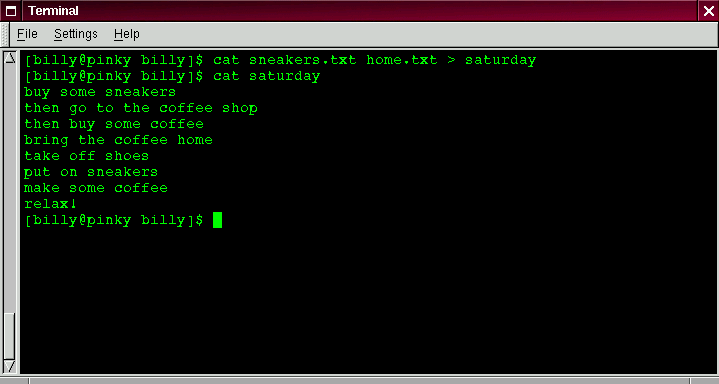
at the prompt. Let's use cat again to join home.txt with sneakers.txt and redirect the output of both files to a brand new file we'll call saturday (you'll find an example in Figure 3-13).
That's it. Now it's time to check our handiwork. Type:
and you should see something like this:
You can see that cat has added home.txt where sneakers.txt left off.
|
|