| Red Hat Documentation |
 |
SPARC: Installing SILOIf you're performing a workstation- or server-class installation, please skip ahead to the section called Time Zone Configuration. In order to be able to boot your Red Hat Linux/SPARC system, you usually need to install SILO. You can decide not to install SILO, however. Create boot disk -- If you do not want to create a boot disk, don't select this option (note that SMCC manufactured UltraSPARCs can't boot from a floppy; therefore, you can't create a book disk for a SMCC Ultra). If your SPARC will boot from a floppy, however, we strongly urge you to create a boot disk. A boot disk can be handy for a number of reasons: You can use a boot disk instead of SILO. This is handy if you're trying Red Hat Linux for the first time, and you'd feel more comfortable if the boot process for your other operating system is left unchanged. With a boot disk, going back to your other operating system is as easy as removing the boot disk and rebooting. You can use a boot disk if another operating system overwrites SILO. Other operating systems may not be as flexible as Red Hat Linux when it comes to supported boot methods. Quite often, installing or updating another operating system can cause the master boot record (originally containing SILO) to be overwritten, making it impossible to boot your Red Hat Linux installation. The boot disk can then be used to boot Red Hat Linux so you can reinstall SILO. Do not install SILO -- If you choose not to install SILO for any reason, make sure that you have chosen to create a boot disk; otherwise you will not be able to boot Linux. You can also choose to skip SILO if you do not want to write SILO to your hard drive.
If you do install SILO, you may install SILO in one of two places:
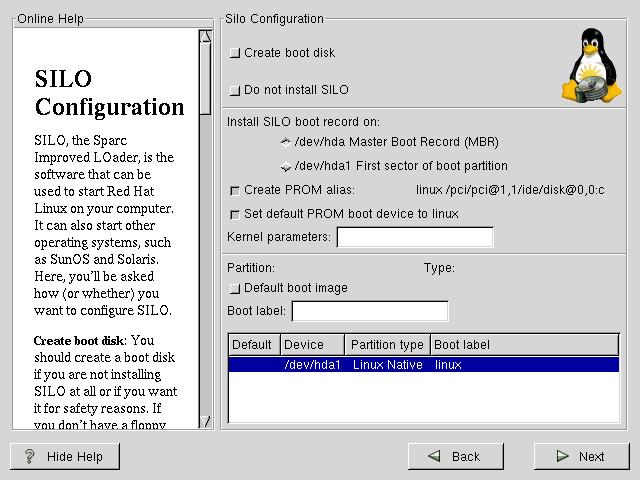
If you choose to install SILO, please select where you would like SILO to be installed on your system (see Figure 6-9). If your system will use only Red Hat Linux you should choose the master boot record (MBR).
If the Create PROM alias: checkbox is checked, and if PROM supports it, the installer will create a PROM alias "linux." The "linux" PROM alias will allow you to boot into SILO from the PROM command line with boot linux. If the Set default PROM boot device to linux checkbox is checked, the installer will set the PROM option "boot-device" or "boot-from" so that PROM will boot by default into Red Hat Linux. If you wish to add default options to the SILO boot command, enter them into the kernel parameters field. Any options you enter will be passed to the Linux kernel every time it boots. Bootable Partition -- Every bootable partition is listed, including partitions used by other operating systems. The Boot label column will be filled in with the word linux on the partition holding your Red Hat Linux system's root filesystem. Other partitions may also have boot labels. If you would like to add boot labels for other partitions (or change an existing boot label), click once on the partition to select it. Once selected, you can change the boot label.
Alternatives to SILOIf you do not wish to use SILO to boot your Red Hat Linux system, you have two choices for booting your machine: a boot disk or OpenBoot. SMP Motherboards and SILOThis section is specific to SMP motherboards only. If the installation program detects an SMP motherboard on your system, it will automatically create two silo.conf entries, rather than the usual single entry. One entry will be called linux and the other will be called linux-up. The linux entry will boot by default. However, if you have trouble with the SMP kernel, you can elect to boot the linux-up entry instead. You will retain all the functionality as before, but you will only be operating with a single processor. |
|
||||||||||||||||||