Both VeriSign and Thawte will issue you a temporary certificate which
you can use to test your Red Hat Linux Apache/SSL Server to make sure it is working.
Another option, which we'll discuss first, is to create your own test
certificate using OpenSSL.
To create your own test certificate, type in make
testcert on the command line.
Your display will show the text similar to the following and wait for
your password input. If you disabled the password option, it will not
prompt you for a password.
/usr/sbin/openssl
Signature ok
Getting Private key
Enter PEM pass phrase:
|
OpenSSL will generate a test certificate and place it in a file named
server.crt. You can use
server.crt to test your secure server.
See the section called Installing and Testing Your Certificate to install this test
certificate and test your Red Hat Linux Apache/SSL Server.
To request a test certificate from VeriSign, point your Web browser to
https://digitalid.verisign.com/server/trial/trialIntro.htm.
Follow these instructions:
Read through the information on the Before You
Start page. You'll probably want to take a look at the
VeriSign Trial Subscriber Agreement. Click on
Continue when you're finished.
The next page, Generate CSR, shows you
instructions on how to generate a CSR. If you followed the
instructions in the section called Generating a Certificate Request, you
already have a CSR in your server.csr file.
If not, create your key and CSR using those instructions now.
Then click on Continue in the bottom right
corner to continue.
The next page, Submit CSR, is shown in Figure 3-1. On this page, you'll actually
need to do something. Copy the contents of your
server.csr file (including the
BEGIN CERTIFICATE REQUEST line
and the END CERTIFICATE REQUEST
line) and paste them into the text box. After doing so, the page
should look something like Figure 3-2.
Click on Continue at the bottom right of
the Submit CSR page to continue.
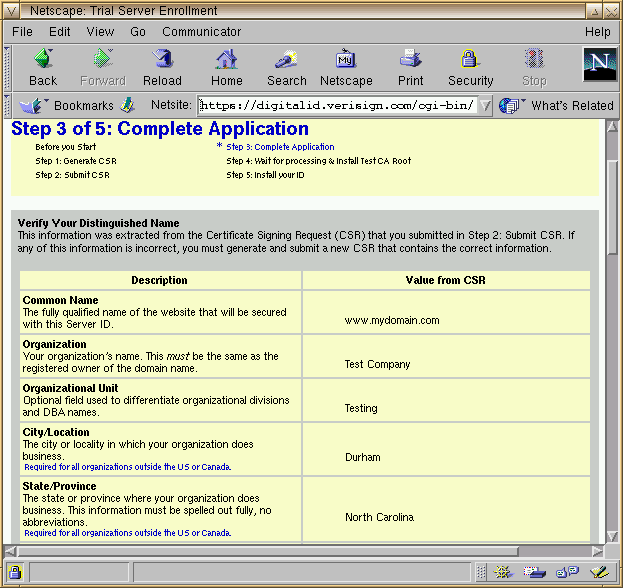
The next page, Complete Application, is shown
in Figure 3-3. The top of this page will
be automatically filled in with the information you provided when
you created your certificate request.
Scroll down to the bottom of the page, which will contain a form
for you to fill out. You need to fill in the blanks with contact
information for your Red Hat Linux Apache/SSL Server's administrator.
After you have filled in the correct information for your
Red Hat Linux Apache/SSL Server's administrator or webmaster, you should read the server
agreement provided at the bottom of the page. Then click on
Accept at the bottom of the page to
indicate that you accept the terms of the agreement and that you
would like to be issued a test certificate.
VeriSign should indicate that your application was received and
processed and email you a test certificate. If you receive an
error message instead, follow whatever instructions it provides,
but first check your email. Even if you received an error message
indicating that there was some problem with your application and
that you'll need to email your application to them, the test
certificate may have already been emailed to you.
Save the test certificate, including the BEGIN
CERTIFICATE line and the END
CERTIFICATE line, in a file named
server.crt in your
/etc/httpd/conf/ssl.crt directory.
See the section called Installing and Testing Your Certificate for instructions on how
to install your test certificate.
To request a test certificate from Thawte, point your Web browser to
https://www.thawte.com/cgi/server/test.exe
(figure Figure 3-4) and follow the
instructions provided next.
Cut and paste your certificate request (the contents of your
server.csr file) into the
Certificate Signing Request text box on
Thawte's Web page.
Select when you need the test certificate to be valid (this may
only be relevant before 1/1/2025).
Select Test X509v3 SSL Cert as the Type of
Test Certificate.
Select Use the default for your kind of cert
for the Certificate Format.
Click the Generate Test Certificate button
at the bottom of the page.
The returned Web page will include your test certificate (an
example is shown as Figure 3-5).
Cut and paste the test certificate into a file named
server.crt in your
/etc/httpd/conf/ssl.crt directory.
See the section called Installing and Testing Your Certificate for instructions on how
to install the test certificate and test your Red Hat Linux Apache/SSL Server.