|
|
|
|
|
|||
|
|||
|
|
|
|
|
|
|
|
|
 |
 |
|
|
|||
| Red Hat Documentation |
 |
The following documentation
can serve as additional resource for working with the VR4100
processors.
(NEC document #U11852EU1V0UM00, September 1996) (MIPS Technologies, Inc., 1995) (Joseph Heinrich, Prentice-Hall, 1993, ISBN 0-13-105925-4) (Gerry Kane & Joe Heinrich, Prentice-Hall, 1992, ISBN 0-13-590472-2) (de Groot, G. J. and Lear, E., February 1996) (Prentice-Hall, 1991, ISBN 0-13-880170-3) (Prentice-Hall, 1991, ISBN 0-13-880170-3) Compiler features for VR4100 processorsFor
a list of available generic compiler options, see GNU
CC command options and Option
summary for GCC in Using
GNU CC in GNUPro Compiler Tools. In addition, the following
VR4100-specific
command-line options are supported.
Compile code for the processor in little endian mode.Compile code for the processor in big-endian mode. Preprocessor symbols for VR4100 processorsSee Preprocessors
symbols and their definitions for VR4100
processors for preprocessors
symbols and their definitions with the GNU compiler options.
note:ABI summary for VR4100 processorsThe following documentation
discusses the Application Binary Interface (ABI)
issues for the VR4100 processors.
GNUPro Toolkit for the
MIPS16 does not comply with the proposed MIPS Embedded Application Binary
Interface (EABI) because that EABI has not yet been finalized.
Data types and alignment for VR4100 processorsSee Data
type sizes and alignments for VR4100
processors for the data type sizes and alignments for
VR4100
processors.
Data type sizes and alignments for VR4100 processorsRegister allocation for VR4100 processorsnote:Do not depend on this order.
Instead, use GCC's `asm( )' extension and allow the compiler
to schedule registers.
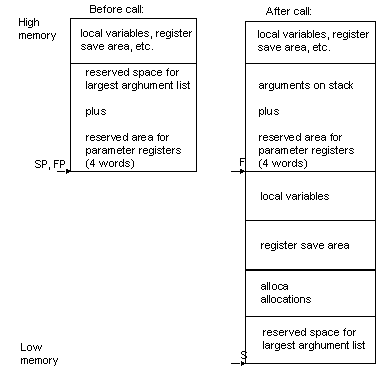
The stack frame for VR4100 processorsThe stack frame specifics
for the VR4100
processors have the following guidelines. See
Stack frame guidelines for the VR4100
processors for stack frame specifics for the VR4100
processors.
Stack frame guidelines for the VR4100 processors
Argument passing for VR4100 processorsThe compiler passes arguments
to a function using a combination of integer general registers, and the
stack. The number, type, and relative position of arguments in the calling
functions argument list define the combination of registers and memory
used. The general registers ` $4..$7' pass the first few arguments.
If the function being called
returns a structure or union, the calling function passes the address of
an area large enough to hold the structure to the function in `$4'.
The function being called copies the returned structure into this area
before returning. The address in `$4' becomes the first
argument to the function for the purpose of argument register allocation.
All user arguments are then shifted down by one.
The compiler always allocates
space on the stack for all arguments even when some or all of the arguments
to a function are passed in registers. This stack space is a large enough
structure to contain all the arguments. After promotion and structure return
pointer insertion, the arguments are aligned according to normal structure
rules. Locations used for arguments within the stack frame are referred
to as the home locations.
Floating point numbers are handled the same way as integers of equivalent size. The compiler passes structures and unions as if they were very wide integers with their size rounded up to an integral number of words. The "fill bits" necessary for rounding up are undefined. A structure can be split so that a portion is passed in registers and the remainder passed on the stack. In this case, the first words are passed in `$4', `$5', `$6', and `$7' as needed, with additional words passed on the stack. The rules for assigning which arguments go into registers and which arguments must be passed on the stack can be explained by considering the list of arguments itself as a structure, aligned according to normal structure rules. Mapping of this structure into the combination of registers and stack is as follows: the first four words go into the integer registers $4..$7; everything else with a structure offset greater than or equal to 16 is passed on the stack. Function return values for VR4100 processorsA function can return "no
value", an integral or pointer value, a floating-point value (single or
double precision), or a structure; unions are treated the same as structures.
A function that returns
an integral, a pointer value, or a floating-point value places its result
in register `$2'.
The caller to a function that returns a structure or a union passes the address of an area large enough to hold the structure in register `$4'. The function returns a pointer to the returned structure in register `$2'. Assembler features for VR4100 processorsFor a list of available
generic assembler options, see Command-line
options in Using
as
in
GNUPro Utilities.
Any MIPS configuration of the assembler can select big-endian or little-endian output at run time.
Linker issues for VR4100 processorsFor a list of available
generic linker options, see Linker
scripts in Using
ld
in
GNUPro Utilities. In addition, the following VR4100-specific
command-line options are supported.
Link objects for the processor in little endian mode. Link objects for the processor in big-endian mode. Linker script for VR4100 processorsThe GNU linker uses a linker
script to determine how to process each section in an object file, and
how to lay out the executable. The linker script is a declarative program
consisting of a number of directives. For instance, the ENTRY(
) directive specifies which symbol in the executable will be designated
the executable's entry point. Since linker scripts can be complicated to
write, the linker includes one built-in script that defines the default
linking process.
The following `pmon.ld'
linker script should be used when linking programs for the NEC DDB- VR4100
board. It can also be used to link programs for execution in the MIPS simulator.
ENTRY(_start) OUTPUT_ARCH("mips:4000")
OUTPUT_FORMAT("elf32-bigmips", "elf32-bigmips", "elf32-littlemips")
GROUP(-lc -lpmon -lgcc) SEARCH_DIR(.) __DYNAMIC = 0; /* Allocate the stack to be at the top of memory, since the stack grows down */ PROVIDE (__stack = 0); /* PROVIDE (__global = 0); */ /*Initalize some symbols to be zero so we can reference them in the crt0 without core dumping. These functions are all optional, but we do this so we can have our crt0 always use them if they exist. This is so BSPs work better when using the crt0 installed with gcc. We have to initalize them twice, so we multiple object file formats, as some prepend an underscore. */ PROVIDE (hardware_init_hook = 0); PROVIDE (software_init_hook = 0); SECTIONS {
. = 0xA0020000; .text : {
_ftext = . ; *(.init) eprol = .; *(.text) *(.mips16.fn.*) *(.mips16.call.*) PROVIDE (__runtime_reloc_start = .); *(.rel.sdata) PROVIDE (__runtime_reloc_stop = .); *(.fini) etext = .; _etext = .; } . = .; .rdata : {
*(.rdata) } _fdata = ALIGN(16); .data : {
*(.data) CONSTRUCTORS } . = ALIGN(8); _gp = . + 0x8000; __global = _gp; .lit8 : {
*(.lit8) } .lit4 : {
*(.lit4) } .sdata : {
*(.sdata) } . = ALIGN(4); edata = .; _edata = .; _fbss = .; .sbss : {
*(.sbss) *(.scommon) } .bss : {
_bss_start = . ; *(.bss) *(COMMON) } end = .; _end = .; } Debugger issues for VR4100 processorsTo
connect GDB to the DDB-VR4100
board, start GDB with the `ddb'
target. DDB boards are little-endian and use the PMON monitor. GDB uses
the MIPS remote debugging protocol to talk to this target via a serial
port. Additionally, the `ddb' target supports network downloading
using the TFTP protocol.
To run a program on the
DDB-VR4100 board, start up GDB with the name of your program as the argument.
To connect to the DDB-VR4100
board, for instance, use the `target ddb <port>' command,
where `<port>'is the name of the serial port connected to the board.
If the program has not already been downloaded to the board, you can use the `load' command to download it. You can then use all the usual GDB commands. For example, the following example's input connects the target board through a Unix serial port, and loads and runs a program called `prog' through the debugger. % mips64vr4100-elf-gdb
prog
(gdb)target ddb /dev/ttyb
On PC platforms substitute the specific COM port, using the following example's input. C:\> gdb
prog
(gdb)target ddb com3
You can speed up loading of programs on the DDB board by installing a network card on the board and using TFTP (trivial file transfer protocol) to download programs to the board. You must first configure the DDB board manually for network use. Target command options for VR4100 processors
target ddb <port> <remote-tftp-name> target ddb <hostname>:<portnumber>
<remote-tftp-name>
target ddb <port> <remote-tftp-name> <local-tftp-name> target ddb <hostname>:<portnumber>
<remote-tftp-name> <local-tftp-name>
The following example shows input for a TFTP download. The host machine running the TFTP server has the IP address `192.168.1.1'. The temporary file that GDB will create for TFTP downloading is `/tmp/download.tmp'. % mips64vr4100-elf-gdb
prog
(gdb)target ddb /dev/ttyb 192.168.1.1:/tmp/download.tmp
In the next example, both a remote TFTP name and a local TFTP are specified, because the TFTP server is running on a different machine, and has a different name for the same temporary file than the host machine that is running GDB. The name of the temporary file as seen by the TFTP server is `/mymachine/tmp/download.tmp', but the name of that same file as seen by the host running GDB is `/tmp/download.tmp'. % mips64vr4100-elf-gdb
prog
(gdb)target ddb /dev/ttyb \
Special debugging commands for VR4100 boardsFor this to be useful, you must know something about the MIPS debugging protocol, also called `rmtdbg'. An informal description can be found in the GDB source files, specifically in the file: `remote-mips.c'. You can see some
debugging information about communications with the board by setting the
`remotedebug'variable. If you set it to 1 using
set retransmit-timeout seconds show retransmit-timeout
set retransmit-timeout
seconds
The timeout set by `set timeout' does not apply when GDB is waiting for your program to stop. In that case, GDB waits forever because it has no way of knowing how long the program is going to run before stopping. Stand-alone simulator issues for VR4100 processorsThe following documentation
discusses the three run-time command-line options for the stand-alone simulator:
-t,
-vand
-m. Before you can download a program to the DDB board,
without GDB, the program must be converted into S-records. See also Producing
S-records for VR4100
boards.
The simulator writes the trace information to the file `trace.din'. Here are the first few lines of a trace file: 2 00000000a0020000
; width 4 ; load instruction
Producing S-records for VR4100 boardsThe following documentation
describes how to download and run directly on the DDB board. Before you
can download a program to the DDB board, without GDB, the program must
be converted into S-records.
Then, with the following command, read the contents of the `hello.x1'executable, convert the code and data into S-records, and put the result into the `hello.srec' file. mips64vr4100-elf-objcopy -O srec hello.x1 hello.srec The following first few lines are from the resulting `hello.srec' download. S00D000068656C6C6F2E7372656303
Downloading to the DDB board for VR4100 boardsYou can download programs
to the DDB board for execution directly on the board, without GDB. The
DDB board has a standalone ROM monitor called PMON that supports loading
of programs via a serial port or Ethernet.
Use the Unix `tip'
program to download a program to the DDB. In the following example, the
DDB board is connected to serial port `/dev/ttya' on a
Unix host.
NEC010>load tty0 Downloading from tty0, ^C to abort ~>hello.srec NEC010> g Downloading a program via Ethernet is similar. First, convert the program to S-records; see Producing S-records for VR4100 boards (above). Then, copy the S-record file to a directory that is readable by all users, and use the `chmod o+r' Unix command to make the S-record file readable. A good choice is a `/tmp' directory, since it is likely to be already readable by all users. PMON uses the TFTP protocol to download programs via Ethernet. You must have a TFTP server running on your Unix host in order to use net downloads. This server can be installed by your system administrator. The following example shows a net download (`%' being a shell prompt). Substitute your Unix host's name or IP address for `host' in the `load' command. %chmod o+r /tmp/hello.srec %tip /dev/ttya NEC010>load host:/tmp/hello.srec
Developing for the VR4300 processors
(NEC document #U11852EU1V0UM00 September 1996) (MIPS Technologies, Inc. 1995) (Joseph Heinrich, Prentice-Hall, 1993, ISBN 0-13-105925-4) (Gerry Kane & Joe Heinrich, Prentice-Hall, 1992, ISBN 0-13-590472-2) (de Groot, G. J. and Lear, E. , February 1996) (Prentice-Hall, 1991, ISBN 0-13-880170-3) (Prentice-Hall, 1991, ISBN 0-13-880170-3) Compiler features for the VR4300 processors
For a list of available
generic compiler options, GNU
CC command options and Option
summary for GCC in Using
GNU CC in GNUPro Compiler Tools. In addition, the following
VR4300-specific
command-line options are supported.
Compile code for the processor in little endian mode.Compile code for the processor in big-endian mode. GNUPro Toolkit for the
VR4300
does not comply with the proposed MIPS Embedded Application Binary Interface
(EABI) because that EABI has not yet been finalized.
Preprocessor symbols for VR4300 processorsSee Preprocessors
symbols and their definitions for the VR4300
processor for preprocessor
symbols and their definitions with the GNU compiler options.
Note:See Data
type sizes and alignments for VR4300 processors
for data type sizes and alignments for VR4300processors.
The stack is aligned on eight-byte boundaries. Argument passing for VR4300 processorsThe compiler passes arguments
to a function using a combination of integer general registers, floating-point
registers, and the stack. The number, type, and relative position of arguments
in the calling functions argument list define the combination of registers
and memory used. The general registers `$4..$7' and the
floating-point registers `$f12' and `$f13'
pass the first few arguments.
If the function being called
returns a structure or union, the calling function passes the address of
an area large enough to hold the structure to the function in `$4'.
The function being called copies the returned structure into this area
before returning. The address in `$4' becomes the first
argument to the function for the purpose of argument register allocation.
All user arguments are then shifted down by one.
The compiler always allocates
space on the stack for all arguments even when some or all of the arguments
to a function are passed in registers. This stack space is a large enough
structure to contain all the arguments. After promotion and structure return
pointer insertion, the arguments are aligned according to normal structure
rules. Locations used for arguments within the stack frame are referred
to as the home locations.
Whenever possible, arguments declared in variable argument lists, as with those defined using a `va_list' declaration, are passed in the integer registers, even when they are floating-point numbers. If the first argument is an integer, remaining arguments are passed in the integer registers. The compiler passes structures and unions as if they were very wide integers with their size rounded up to an integral number of words. The "fill bits" necessary for rounding up are undefined. A structure can be split so that a portion is passed in registers and the remainder passed on the stack. In this case, the first words are passed in `$4', `$5', `$6', and `$7' as needed, with additional words passed on the stack. The rules for assigning which arguments go into registers and which arguments must be passed on the stack can be explained by considering the list of arguments itself as a structure, aligned according to normal structure rules. Mapping of this structure into the combination of registers and stack is as follows: up to two leading floating-point (but not `va_list') arguments can be passed in `$f12' and `$f13'; everything else with a structure offset greater than or equal to 32 is passed on the stack. The remainder of the arguments are passed in `$4..$7' based on their structure offset. Any holes left in the structure for alignment are unused, whether in registers or on the stack. Function return values for VR4300 processorsA function can return no
value, an integral or pointer value, a floating-point value (single or
double precision), or a structure; unions are treated the same as structures.
A function that returns no value puts no particular value in any register.
A function that returns an integral or pointer value places its result
in register `$2'. A function that returns a floating-point
value places its result in floating-point register `$f0'.
The caller to a function
that returns a structure or a union passes the address of an area large
enough to hold the structure in register `$4'. The function
returns a pointer to the returned structure in register `$2'.
Register allocation for VR4300 processorsSee Floating point register usage for VR4300 processors for floating point register usage for VR4300 processors.
Do not depend on this order.
Instead, use GCC's `asm( )' extension and allow the compiler
to schedule registers.
Assembler issues for the VR4300 processorsFor a list of available
generic assembler options, see Command-line
options in Using
as
in
GNUPro Utilities.
Any MIPS configuration of the assembler can select big-endian or little-endian output at run time. For information about the
MIPS instruction set, see MIPS RISC Architecture (Kane
and Heindrich, Prentice-Hall). For an overview of MIPS assembly conventions,
see "Appendix D: Assembly Language Programming" in MIPS RISC Architecture.
For specific assembler mnemonics, see MIPS RISC Architecture or MIPS R4000 User's Manual. Linker issues for the VR4300 processorsFor a list of available
generic linker options, see Linker
scripts in Using ldin
GNUPro Utilities. In addition, the following VR4300-specific
command-line options are supported.
-EB
Linker script for VR4300 processorsThe GNU linker uses a linker
script to determine how to process each section in an object file, and
how to lay out the executable. The linker script is a declarative program
consisting of a number of directives. For instance, the ENTRY(
) directive specifies which symbol in the executable will be designated
the executable's entry point. Since linker scripts can be complicated to
write, the linker includes one built-in script that defines the default
linking process.
This linker script (`ddb.ld')
should be used when linking programs for the NEC DDB-VR4300 board. It can
also be used to link programs for execution in the MIPS simulator.
/* The following TEXT start address leaves space for the monitor workspace. */ENTRY(_start) Debugger issues for VR 4300 processorsTo connect GDB to the DDB-VR4300
board start GDB with the `ddb'
target. DDB boards are little-endian and use the PMON monitor. GDB uses
the MIPS remote debugging protocol to talk to this target via a serial
port. Additionally, the `ddb' target supports network downloading
using the TFTP protocol.
To run a program on the
DDB-VR4300 board, start up GDB with the name of your program as the argument.
To connect to the DDB-VR4300 board, use the `target ddb <port>'
command , where `<port>'is the name of the serial port connected to
the board.
If the program has not
already been downloaded to the board, you can use the `load'
command to download it. You can then use all the usual GDB commands.
For example, the following sequence connects to the target board through a Unix serial port, and loads and runs a program called `prog' through the debugger: mips64vr4300-elf-gdb
prog
(gdb)target ddb /dev/ttyb
On PC platforms substitute the specific COM port: C:\> gdb
prog
(gdb)target ddb com3
You can speed up loading of programs on the DDB board by installing a network card on the board and using TFTP (trivial file transfer protocol) to download programs to the board. You must first configure the DDB board manually for network use. Target command options for VR4300 processors
target ddb <port> <remote-tftp-name> target ddb <hostname>:<portnumber>
<remote-tftp-name>
target ddb <port> <remote-tftp-name> <local-tftp-name> target ddb <hostname>:<portnumber>
<remote-tftp-name> <local-tftp-name>
The following example shows a TFTP download. The host machine running the TFTP server has the `192.168.1.1' IP address . The temporary file that GDB will create for TFTP downloading is the `/tmp/download.tmp' file. mips64vr4300-elf-gdb
prog
(gdb)target ddb /dev/ttyb 192.168.1.1:/tmp/download.tmp
In the next example both a remote TFTP name and a local TFTP are specified, because the TFTP server is running on a different machine, and has a different name for the same temporary file than the host machine that is running GDB. The name of the temporary file as seen by the TFTP server is `/mymachine/tmp/download.tmp', but the name of that same file as seen by the host running GDB is `/tmp/download.tmp'. mips64vr4300-elf-gdb
prog
(gdb)target ddb /dev/ttyb \
Special commands for V R 4300 processorsFor this to be useful, you must know something about the MIPS debugging protocol, also called `rmtdbg'. An informal description can be found in the GDB source files, specifically in the file: `remote-mips.c'. You can see some
debugging information about communications with the board by setting the
`remotedebug'variable. If you set it to 1 using
set retransmit-timeout seconds show retransmit-timeout
set retransmit-timeout
seconds
The timeout set by `set timeout' does not apply when GDB is waiting for your program to stop. In that case, GDB waits forever because it has no way of knowing how long the program is going to run before stopping. Stand-alone simulator features for VR4300 processorsThe following three run-time
command-line options are for the stand-alone simulator: -t,
-v,
and -m.
The simulator writes the trace information to the file `trace.din'. The following example shows the first few lines of a trace file. 2 00000000a0020000
; width 4 ; load instruction
Producing S-records for VR4300 processorsBefore you can download
a program to the DDB board, without GDB, the program must be converted
into S-records.
First, compile a little-endian
executable (`hello.xl') using the `-EL'
option to GCC, as the following example input shows.
The following command reads the contents of the `hello.x1' file, converts the code and data into S-records, and puts the result into the `hello.srec' file. mips64vr4300-elf-objcopy -O srec hello.x1 hello.srec The following example output shows the first few lines of the `hello.srec' file. S00D000068656C6C6F2E7372656303
Downloading to the DDB board for VR4300 processorsYou can download programs
to the DDB board for execution directly on the board, without GDB. The
DDB board has a standalone ROM monitor called PMON that supports loading
of programs via a serial port or Ethernet. Use the Unix `tip'
program to download a program to the DDB. In the following example, the
DDB board is connected to serial port `/dev/ttya' on a
Unix host.
Downloading a program via Ethernet is similar. First, convert the program to S-records as described earlier. Then copy the S-record file to a directory that is readable by all users, and use the Unix command `chmod o+r' to make the S-record file readable. A good choice for a directory is `/tmp', since it is likely to be already readable by all users. PMON uses the TFTP protocol to download programs via Ethernet. You must have a TFTP server running on your Unix host in order to use net downloads. This server can be installed by your system administrator. The following example shows a net download. Substitute your Unix host's name or IP address for `host' in the `load' command: % chmod o+r /tmp/hello.srec % tip /dev/ttya NEC010> load host:/tmp/hello.srec
Developing for the VR5xxx processorsThe following documentation
describes developing
with VR5xxx
MIPS processors. The actual development targets that have support are the
5000, 5400, 5432 and 5464 series processors.
For a list of available
generic compiler options, GNU
CC command options and Option
summary for GCC in Using
GNU CC in GNUPro Compiler Tools.
Targets the VR5xxx processors. This is the default setting for all VR5xxx processors. -mcpu=vr5400
-mabi=o64
-mips2
-EL
If neither `-EL' nor `-EB' are defined, little-endian is the default. Preprocessor issues for V R 5 xxx processors
__R5400__
__R5000__
__MIPSEB__
__MIPSEL__
Attributes for VR5xxxprocessorsThere are no VR5xxx-specific
attributes. See Declaring
attributes of functions and Specifying
attributes of variables in Extensions
to the C language family in Using
GNU CC in GNUPro Compiler Tools for more information.
ABI issues for the VR5xxx processors
V R 5 xxxsupports
two types of ABI depending on the value of the `-mabi='
compiler flag (see also Compiler
issues for the VR5xxx processors ).
See 032 ABI summary for VR5xxx processors. See EABI summary for VR5xxx processors .
Size and
alignment for VR5xxx processors using 032
ABI shows the size and alignment for all data types of VR5xxx
processors
with the 032 ABI.
The stack is aligned on eight-byte boundaries.
The compiler passes arguments
to a function using a combination of integer general registers, floating-point
registers, and the stack. The number, type, and relative position of arguments
in the calling functions argument list define the combination of registers
and memory used. The general registers `$4'
through `$7' and the floating-point registers `$f12'
and `$f13' pass the first few arguments.
If the function being called
returns a structure or union, the calling function passes the address of
an area large enough to hold the structure to the function in `$4'.
The function being called copies the returned structure into this area
before returning. The address in `$4' becomes the first
argument to the function for the purpose of argument register allocation.
All user arguments are then shifted down by one.
The compiler always allocates
space on the stack for all arguments even when some or all of the arguments
to a function are passed in registers. This stack space is a large enough
structure to contain all the arguments. After promotion and structure return
pointer insertion, the arguments are aligned according to normal structure
rules. Locations used for arguments within the stack frame are referred
to as the home locations.
Whenever possible, arguments declared in variable argument lists, as with those defined using a `va_list' declaration, are passed in the integer registers, even when they are floating-point numbers. If the first argument is an integer, remaining arguments are passed in the integer registers. The compiler passes structures and unions as if they were very wide integers with their size rounded up to an integral number of words. The "fill bits" necessary for rounding up are undefined. A structure can be split so that a portion is passed in registers and the remainder passed on the stack. In this case, the first words are passed in `$4', `$5', `$6', and `$7' as needed, with additional words passed on the stack. The rules for assigning which arguments go into registers and which arguments must be passed on the stack can be explained by considering the list of arguments itself as a structure, aligned according to normal structure rules. Mapping of this structure into the combination of registers and stack is as follows: up to two leading floating-point (but not `va_list') arguments can be passed in `$f12' and `$f13'; everything else with a structure offset greater than or equal to 32 is passed on the stack. The remainder of the arguments are passed in `$4' through `$7', based on their structure offset. Any holes left in the structure for alignment are unused, whether in registers or on the stack. A function can return no
value, an integral or pointer value, a floating-point value (single or
double precision), or a structure; unions are treated the same as structures.
The following documentation describes the return values in more detail.
See General
purpose (integer) registers for their usage and see Floating
point registers for their usage.
Note:Do not depend on the order
shown in Floating point
registers. Instead, use the `asm( )' compiler extension
to schedule registers.
EABI summary for VR5xxx processors
Data type sizes and alignments for V R 5 xxx using MIPS EABIThe following rules also apply for data types for VR5xxx processors using MIPS ABI.
The following documentation
describes the calling conventions for subroutine
calls for VR5xxxprocessors
using MIPS ABI.
See more
register usage.
Use the following rules for subroutine calls.
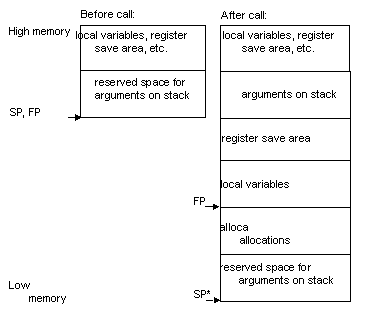
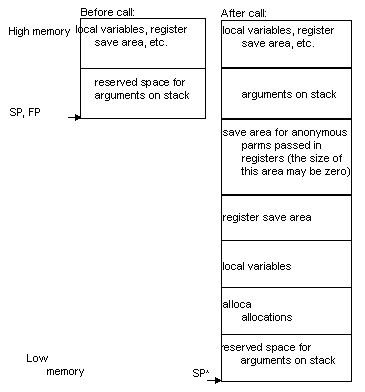
The stack frame for VR5xxx processors
See Stack
frames for functions that take a fixed number of arguments for VR5xxx
processors.
See Stack
frames for functions that take a variable number of arguments
for VR5xxxprocessors.
Parameter assignment to registers for VR5xxx processorsConsider the parameters
in a function call as ordered from left (first parameter) to right. In
this algorithm, `FR' contains the number of the next available
floating-point register (or register pair for modes in which floating-point
registers hold only 32 bits). `GR' contains the number
of the next available general-purpose register. `STARG'
is the address of the next available stack parameter word.
INITIALIZESCANIf there are no more parameters,
terminate. Otherwise, select one of the following depending on the type
of the next parameter: DOUBLEor FLOAT,
SIMPLE
ARG, LONG LONG, or STACK.
DOUBLEor FLOATIf FR > f19,
go to STACK. Otherwise, load the parameter value into the
`FR' floating-point register and advance `FR'
to the next floating-point register (or register pair in 32-bit mode).
Then go to SCAN.
SIMPLE ARG
If GR > r11,
go to STACK. Otherwise, load the parameter value into the
`GR' general-purpose register and advance `GR'
to the next general-purpose register. Values shorter than the register
size are sign-extended or zero-extended depending on whether they are signed
or unsigned. Then go to SCAN.
LONG LONGin 32-bit modeIf GR > r10,
go to STACK. Otherwise, if `GR' is odd,
advance `GR' to the next register. Load the 64-bit `long
long' value into register pair, GRand GR+1.
Advance `GR' to `GR+2' and go to SCAN.
STACKParameters not otherwise
handled like DOUBLEor FLOAT, SIMPLE
ARG, LONG LONG, or SCANare passed
in the parameter words of the caller's stack frame. SIMPLE ARG,
(see SIMPLE ARGdefinition), is considered to have size
and alignment equal to the size of a general-purpose register, with simple
argument types shorter than this sign- or zero-extended to this width.
Float arguments are considered to have size and alignment equal to the
size of a floating-point register. In 64-bit mode, floats are stored in
the low-order 32 bits of the 64-bit space allocated to them. `double'
and `long long' are considered to have 64-bit size and
alignment. Round `STARG' up to a multiple of the alignment
requirement of the parameter and copy the argument byte-for-byte into STARG,
STARG+1,
and son through STARG+size-1. Set `STARG'
to `STARG+size' and go to SCAN.
Structure passing for VR5xxxCode that passes structures
and unions by value is implemented specially. (In this documentaion, structwill
refer to structs and unions inclusively.) Structs small enough to fit in
a register are passed by value in a single register or in a stack frame
slot which is the size of a register. Larger structs are handled by passing
the address of the structure. In this case, a copy of the structure will
be made if necessary in order to preserve the pass-by-value semantics.
See also Parameter
assignment to registers for VR5xxx.
See Structure
passing for the rules for copies of large structs for VR5xxx
processors.
In the case of normal (non-varargs) large-struct parameters in ANSI mode, the callee is responsible for producing the same effect as if a copy of the structure were passed, preserving the pass-by-value semantics. Have the callee make a copy; however, in some cases, the callee can determine that a copy is unnecessary to produce the same results. In such cases, the callee can choose to avoid making a copy of the parameter. Varargs handling for VR5xxxNo special changes are
needed for handling varargs parameters other than the caller knowing that
a copy is needed on struct parameters larger than a register (see Structure
passing).
The varargs macros set
up a two-part register save area, one part for the general-purpose registers
and one part for floating-point registers. Maintain separate pointers for
these two areas and for the stack parameter area. The register save area
lies between the caller and callee stack frame areas.
In the case of software
floating-point, only the general-purpose registers need saving. Because
the save area lies between the two stack frames, the saved register parameters
are contiguous with parameters passed on the stack, simplifying the varargs
macros. Only one pointer is needed, which advances from the register save
area into the caller's stack frame.
Function return values for VR5xxxSoftware floating-point for VR5xxxFor software floating-point
implementations, floats shall be passed and returned like int,
and double passes and returns like long long.
This implies that, in 32-bit mode, floatwill pass in a
single integer register and doublewill pass in an even/odd
register pair. Similarly, float will return in a single
register, r2, and double will return in
a r2/r3 register pair.
Assembler issues for the VR5xxx processors
For a list of available
generic assembler options, see Command-line
options in Using asin
GNUPro Utilities. The assembler accepts the same set of 5xxx options
as the compiler.
-mcpu=vr5400
-mabi=o64
-mips2
-EL
-EB
If neither `-EL' nor `-EB' are defined, little-endian is the default. For information about the MIPS instruction set, see MIPS RISC Architecture (Kane and Heindrich, Prentice-Hall). For an overview of MIPS assembly conventions, see "Appendix D: Assembly Language Programming" in MIPS RISC Architecture. There are 32 64-bit general (integer) registers, named `$0 through$31'. There are 32 64-bit floating-point registers, named `$f0 through$f31'. The `$0' through `$31' symbols refer to the general-purpose registers. Symbols and registers for the VR5xxx processorsSee Symbols
and registers for definitions of symbols used as aliases for
individual registers.
Assembler directives for VR5xxxMIPS synthetic instructions for the VR5xxxFor the VR5xxx
processors,
the assembler supports the typical MIPS synthetic instructions (macros).
See a list of synthetic instructions
supported by the assembler, as well as an example expansion of each instruction.
The following information serves as a guide to the corresponding code in
the the list.
Linker issues for VR5xxx processorsThe following documentation
describes VR5xxx-specific
features when working with ld, the GNUPro linker.
For a list of available
generic linker options, see Linker
scripts in Using ld
in GNUPro Utilities. There are no VR5xxx-specific
command-line linker options.
Linker script for VR5xxx targetsThe linker uses a linker
script to determine how to process each section in an object file, and
how to lay out the executable. The linker script is a declarative program
consisting of a number of directives. For instance, the `ENTRY()'
directive specifies the symbol in the executable that will be the executable's
entry point.
/* The following TEXT start address leaves space for the monitor workspace. */ENTRY(_start) Debugger features for the VR5xxx processorsThe following documentation
describes VR5xxx-specific
features of the GNUPro debugger. There are three ways for GDB to talk to
a VR5xxx
target, depending upon the configuration of the specific evaluation board.
GDB's built-in software simulation of the VR5xxx processor allows the debugging of programs compiled for the VR5xxx without requiring any access to actual hardware. To activate this mode in GDB type `target sim'. Then load the code into the simulator by typing `load' and debug it in the normal fashion. To connect to the target board in GDB, using the command `target remote<devicename>' where `<devicename>' will be a serial device such as `/dev/ttya' (Unix) or `com2' (Windows NT). Then load the code onto the target board by typing 'load'. After being downloaded, the program can be executed. Connecting to the ethernet port with GDB is very similar to connecting to a serial port. If the system
administrator has assigned a host name to the board, you can use that name
in the target command instead of the dotted IP address. It is important
to specify the port number. The exact number is not important, but it must
be the same number that you used to configure the board.
No special GDB
commands are necessary to perform fast downloading of programs via the
ethernet. Simply use the normal `load' command. GDB recognizes that the
board is connected via ethernet, and will use a fast binary downloading
method.
For the available generic
debugger options, see Debugging
with GDB in GNUPro Debugging Tools. There are no VR5xxx-specific
debugger command-line options.
Simulator features for the VR5xxx processorsThe simulator implements
the 64 bit MIPS ISA, which includes 32 64-bit integer registers and 32
64-bit floating-point registers. The user program is provided with a single
2mb block of memory at address `0xa0000000'
(shadowed at address `0x80000000').
This selects a specific MIPS instruction set architectur (ISA). Valid ISAs are `mips:5000' and `mips:5400'. By default the `mips:5000' is simulated. --help
--dinero-trace=[on|off]
%mips64vr5xxxel-elf-run
--dinero-trace hello
The resulting first 10 lines of the file produced by the previous output file's input: 2 a0040004 ; width
4 ; load instruction
--dinero-file=<file>
%mips64vr5xxxel-elf-run
--dinero-trace --dinero-file=trace.out hello
--profile-pc
%mips64vr5xxxel-elf-run
--profile-pc hello
--profile-pc-frequency=<frequency>
%mips64vr5xxxel-elf-run
--profile-pc --profile-pc-frequency=128 hello
--profile-pc-size=<size>
%mips64vr5xxxel-elf-run
--profile-pc --profile-pc-size=20000 hello
1.Structures
and unions, up to the size of a long are returned in the same registers
as longs. Larger structures and unions up to the size of long longs are
returned in the same registers as long longs. They are aligned within the
register according to the endianness of the processor; e.g., on a big-endian
processor the first byte of the struct is returned in the most significant
byte of ` r2 ', while on a little-endian processor the first byte
is returned in the least significant byte of ` r2 '. Structures
and unions larger than a long long are handled by the caller passing as
a hidden first argument a pointer to space allocated to receive
the return value.
|
|
|||||||||||||||||||||||||||||||||||||||||||||||||||||||||||||||||||||||||||||||||||||||||||||||||||||||||||||||||||||||||||||||||||||||||||||||||||||||||||||||||||||||||||||||||||||||||||||||||||||||||||||||||||||||||||||||||||||||||||||||||||||||||||||||||||||||||||||||||||||||||||||||||||||||||||||||||||||||||||||||||||||||||||||||||||||||||||||||||||||||||||||||||||||||||||||||||||||||||||||||||||||||||||||||||||||||||||||||||||||||||||||||||||||||||||||||||||||||||||||||||||||||||||||||||||||||||||||||||||||||||||||||||||||||||||||||||||||||||||||||||||||||||||||||||||||||||||||||||||||||||||||||||||||||||||||||||||||||||||||||||||||||||||||||||||||||||||||||||||||||||||||||||||||||||||||||||||||
|
© 2001 Red Hat, Inc. All rights reserved. About Red Hat : Legal statement : Privacy statement : Y2K statement : Contact Red Hat |